Skip to content
Houspensive
The appGuideCalculatorQuestions
Follow launch updates
Menu
The appGuideCalculatorQuestionsPrivacySupportFollow launch updates

Shared expenses, settled.

Know exactly
what’s left
to deposit.

A shared expense app for couples. Add your bills, record what you’ve each put in, and see what’s left to contribute.

Follow launch updates

Coming to iPhone. Take a closer look

Work out your split ↗Free calculator · No account needed
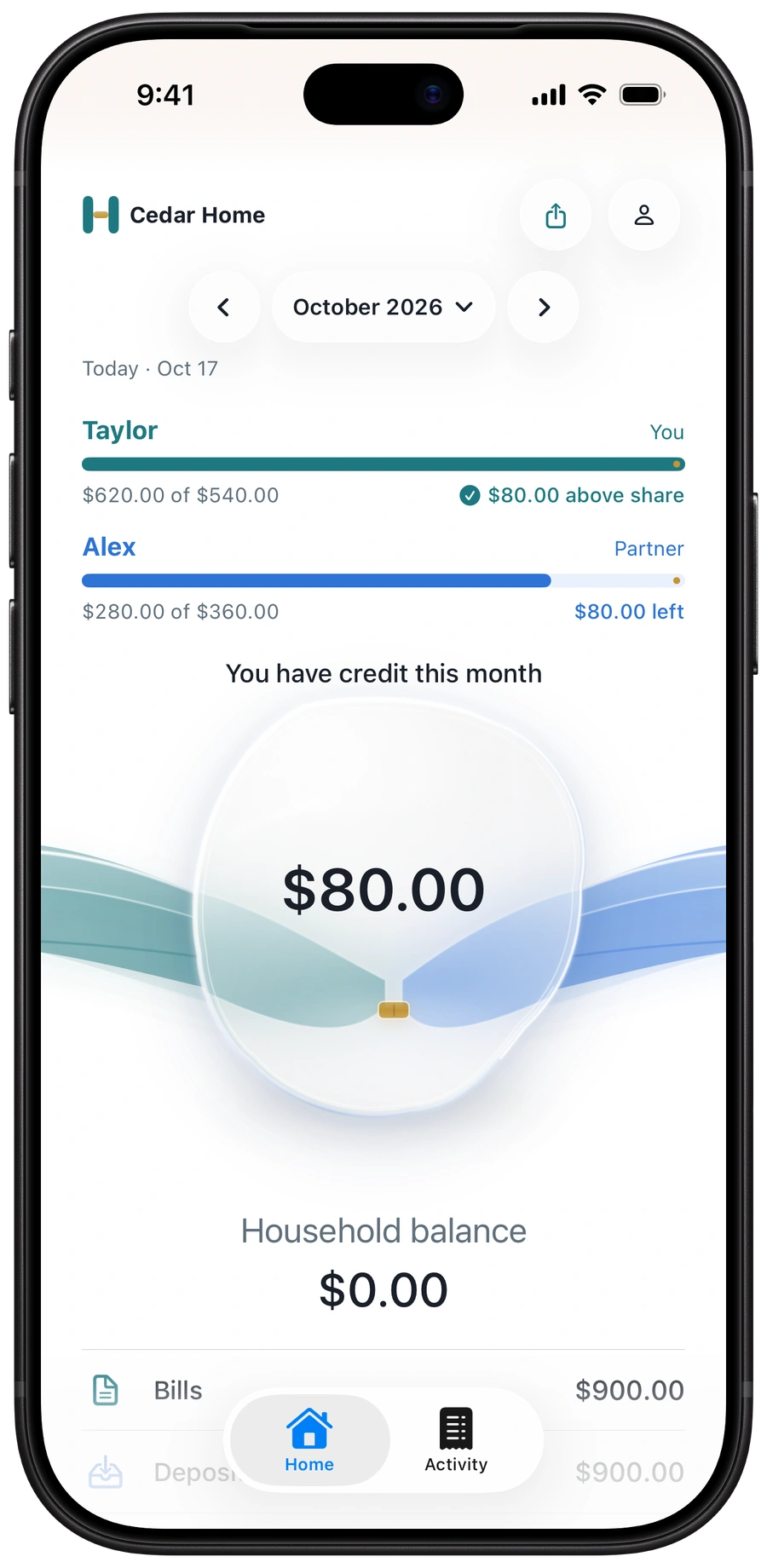
Houspensive Home, October 2026: Taylor is $80 above their share, Alex has $80 left to deposit, and the household balance is $0. Fictional example.
Example month: Taylor has credit.
Alex has more to contribute.

For the life you share.
And the bills that come with it.

One owner subscription.
For one person or two.

Start on your own.
Invite your partner when you’re ready.

A little less to keep track of

Your home, your numbers.
All in one place.

See your bills, what you’ve each put in, and what’s still needed.

Real app captures with fictional data. Each example stands on its own.

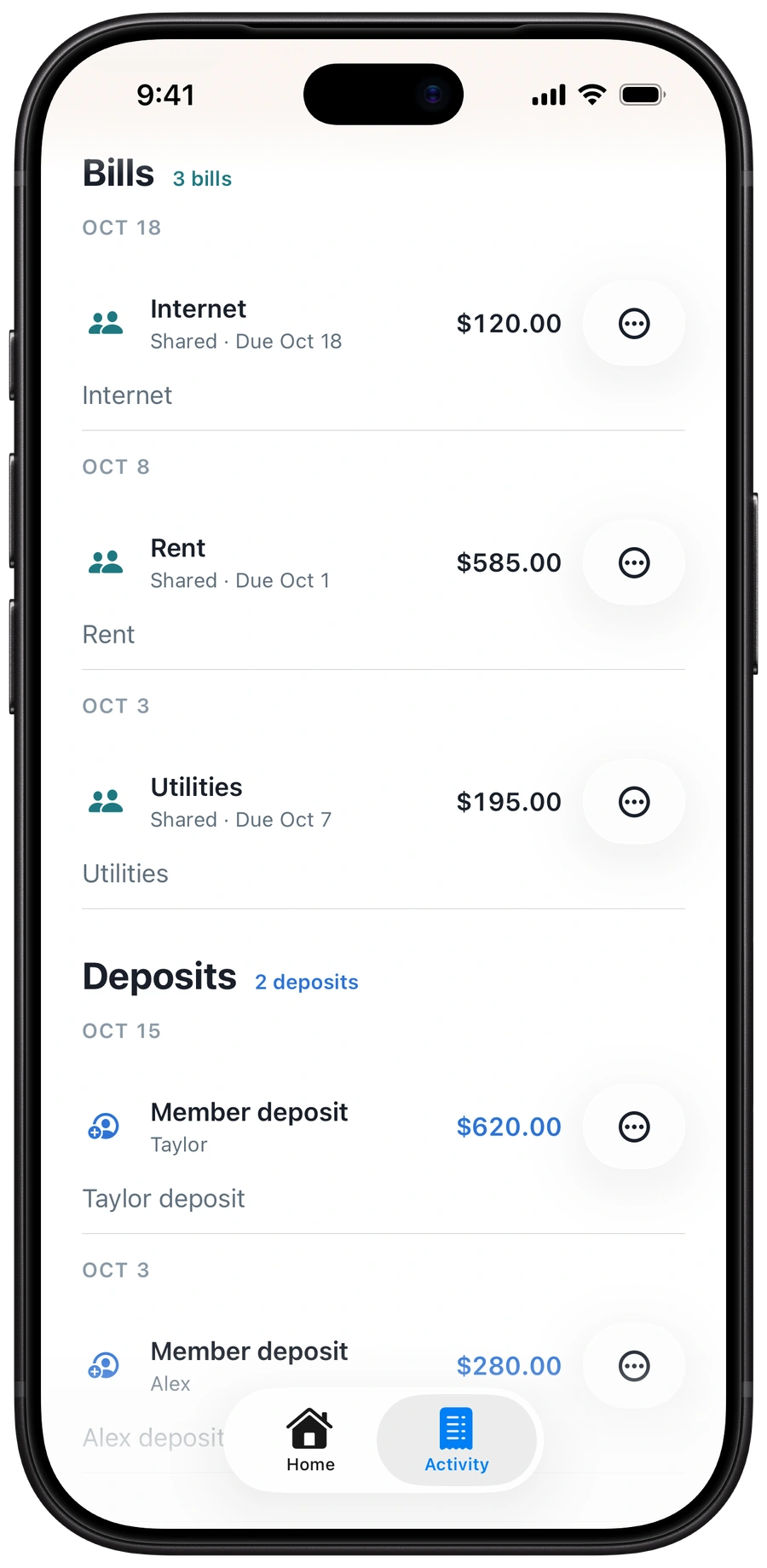
Houspensive Activity: three recorded bills—Internet $120, Rent $585, and Utilities $195—and member deposits of $620 from Taylor and $280 from Alex. Fictional example.
Recorded bills and deposits.
One shared Activity view.

01 / The shared picture

“What are our bills?
What have we put in?”

Rent, groceries, and the money you’ve each put in—keep it all together instead of piecing it back together later.

Home uses your agreed split to show what each person has contributed and what’s left.

Recorded bills
$900.00
Recorded deposits
$900.00

Figures from this Activity example. Recording a deposit doesn’t move money.

02 / Your kind of fair

“We don’t split
everything equally.”

Equal isn’t the only way to share. Choose the starting percentages that feel right for you when you invite your partner.

Houspensive uses your agreed split for shared bills, so you can both see how your share adds up.

Try a different split
You 60%Your partner 40%

Try a shared split here. This illustration is separate from the app’s setup example.

Try this with a bill total ↗
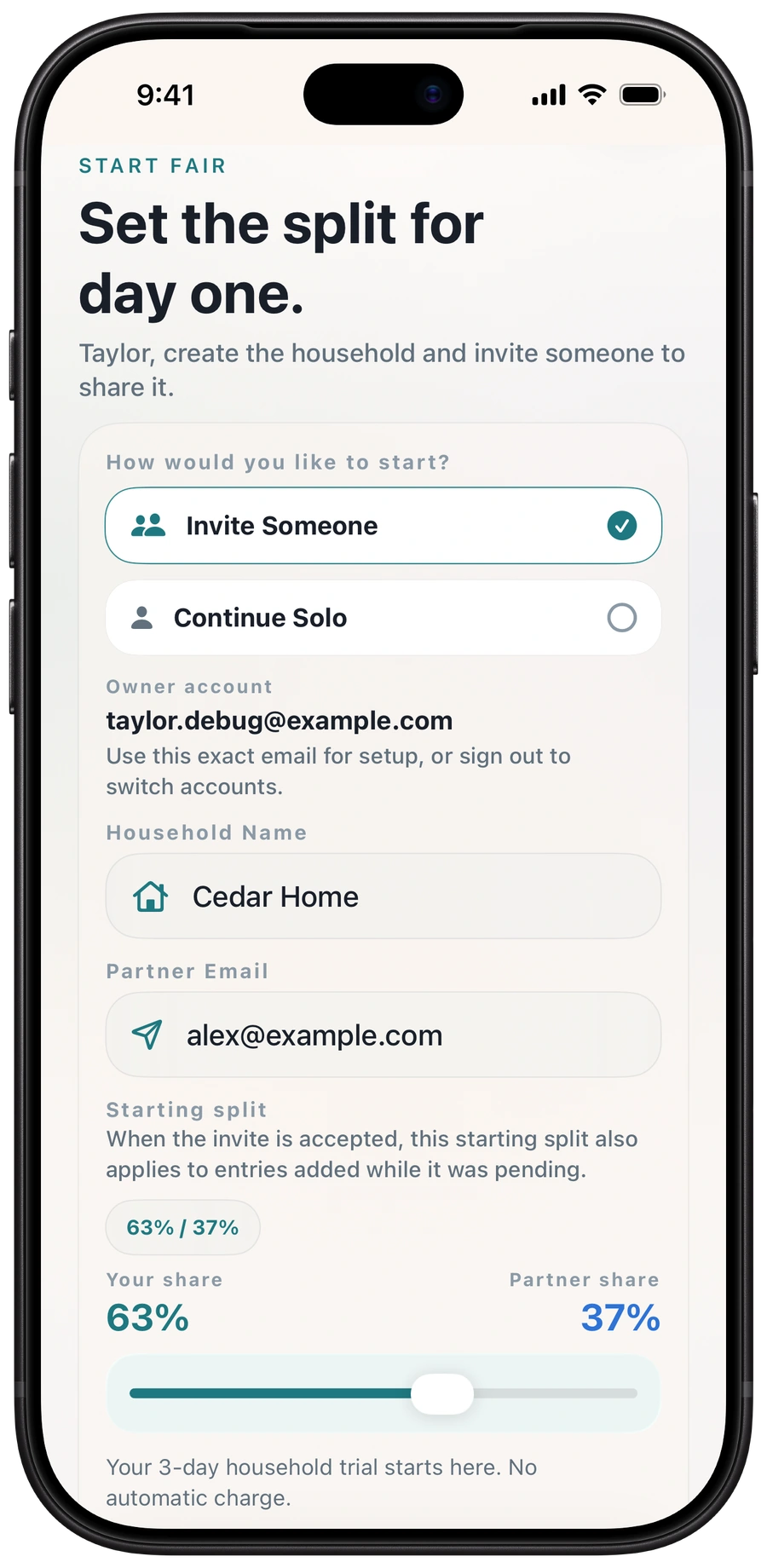
Houspensive household setup draft: Invite Someone selected for fictional Cedar Home, with a starting split of 63 percent for Taylor and 37 percent for the partner. This setup has not been saved.
Choose your starting split.
Unsaved setup example: 63 / 37.
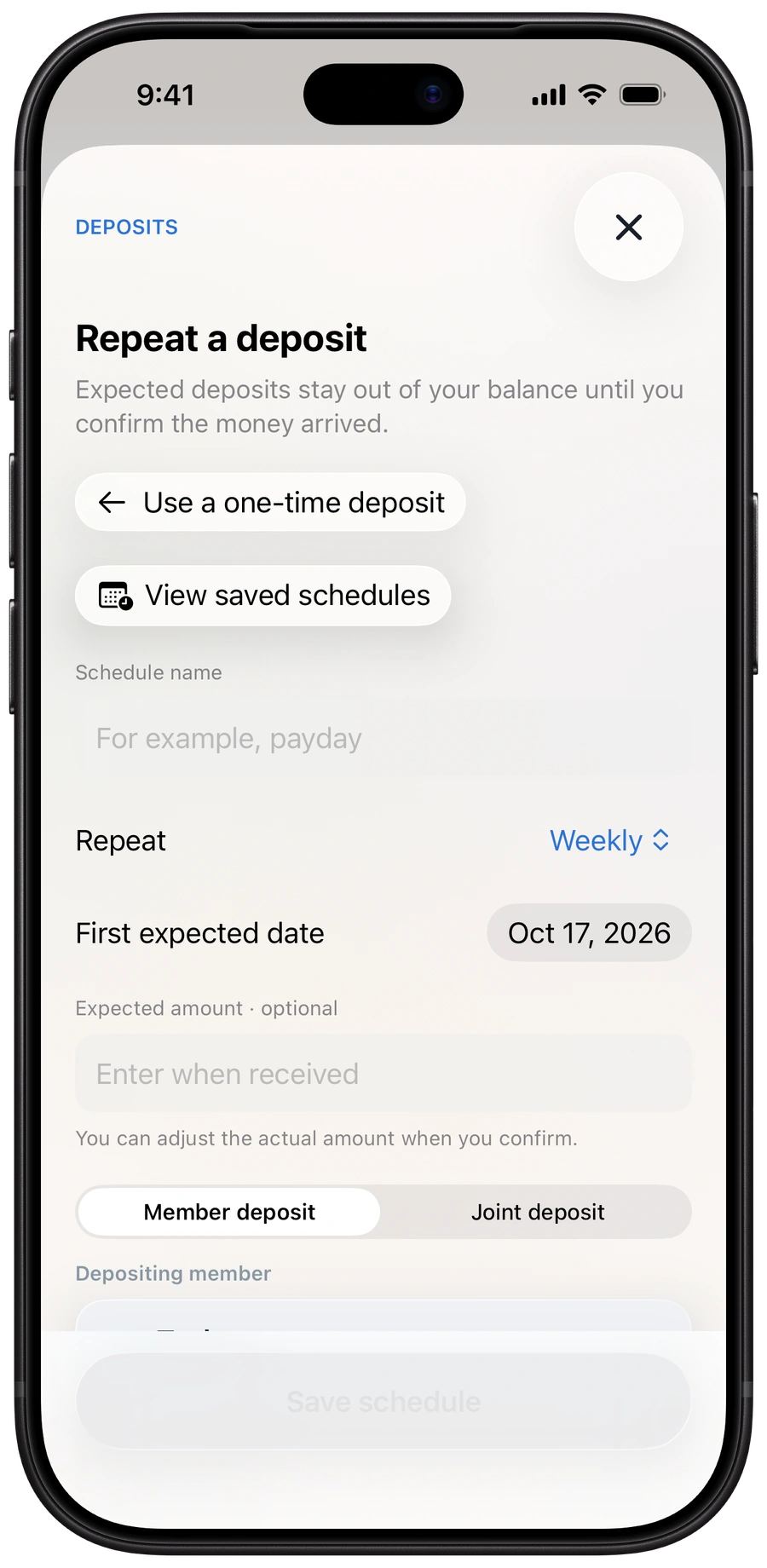
Houspensive Repeat a deposit form: an unsaved weekly member-deposit schedule with a first expected date of October 17, 2026. The form says expected deposits stay out of the balance until receipt is confirmed.
Plan when deposits are expected.
Unsaved weekly schedule example.

03 / Expected isn’t received

“We put money in
every payday.”

If you set money aside regularly, plan a recurring deposit so you know what to expect and when.

When it arrives, confirm it. Until then, it won’t be counted in your balance.

A schedule helps you plan. It doesn’t connect to your bank, transfer money, or post deposits automatically.

04 / A head start, kept

“I put in extra.
Does that still count?”

Yes. If you’ve put in more than your share, you can see that credit instead of having to remember it.

When you close the month, Houspensive reconciles the figures and carries credit into the next month.

This month’s extra.
Next month’s head start.

The same Home example shown above: Taylor has $80 credit while Alex has $80 left. It shows current-month credit, not a completed month close.

The same fictional Home example: Taylor has contributed $620 against a $540 share, giving $80 credit. Alex has contributed $280 against a $360 share, leaving $80 to deposit.
Current credit, clearly shown.
Carried forward when you close the month.

A clearer place to start

Not sure where
to start?

Talk through the options or try the numbers together. These are here whenever you need them.

01 / The guideHow to split shared bills as a couple↗02 / The calculatorTry your shared-bills split↗03 / The conversation kitFive questions for your next money date↗

Good to know

A few things
you might ask.

The practical details, without the guesswork.

Still have a question?Visit support ↗
Can I start without my partner?

Yes. Start on your own and invite one partner later. Your solo household begins with just you, at 100%—no placeholder partner needed.

Does Houspensive move money?

No. You enter your bills and record deposits in the app. Bank transfers and payments happen separately. Houspensive helps you understand the numbers; it doesn’t connect to your bank or pay bills for you.

What does “left to deposit” mean?

It’s the additional amount the app shows a person needs to contribute for the selected month, based on their household’s recorded figures and applicable credit choices. For example, if your share is $360, you’ve deposited $280, and no other balances or credit apply, you have $80 left to deposit. Houspensive doesn’t send a transfer or payment request.

What if one of us contributes extra?

Houspensive shows a person’s credit when they’ve contributed more than their share. For example, if your share is $540 and you’ve deposited $620, that’s $80 above your share in this simple example. Credit stays in the ledger and is carried forward when the month is closed. Each person can choose whether to use their own available credit in an open month; using it changes the requested contribution, not the deposits already recorded.

Do we both need a subscription?

No. One owner subscription covers a household of one or two people. A three-day household trial starts when you create the household, with no automatic charge at its end. An active owner subscription is then required for continued access. The household trial is separate from any Apple introductory offer; available plans and localized prices are shown in the app before purchase.

Can we plan recurring deposits?

Yes. For example, you could plan a $100 deposit each payday. It stays expected—and out of your balance—until you confirm it was received. You can adjust the amount when confirming. Expected, unconfirmed, or skipped deposits don’t count toward your balance. Houspensive doesn’t transfer money or detect bank deposits.

Does it add next month’s bills automatically?

You choose when to prepare the month. Reusable Bill Names help you get started, and you confirm the bills that should count. Expected or unconfirmed plans stay separate from confirmed financial totals.

What happens to our information?

See our privacy policy for how Houspensive handles account and household information, subscription-screen analytics, and this website’s Cloudflare Web Analytics. Need a hand? Visit support.

Where can I get the app?

Houspensive is preparing for launch on iPhone with iOS 26 or later. Follow @Houspensive on X for launch updates. We’ll add the App Store link here when it’s publicly available.
For the home you share

Less “who owes what?”
More on the same page.

Follow launch updates

Coming to iPhone. Shared expenses, settled.

Houspensive

Shared expenses, settled.

GuideCalculatorPrivacySupport@Houspensive

© 2026 Ryan Woloshyn Software
Apple, iPhone, and App Store are trademarks of Apple Inc., registered in the U.S. and other countries.